Weekend Phishing Trip
Part 2 of 4
According to my email, I’m getting an increase in my salary, nice!
It looks like I’m being spear-phished for some reason. They didn’t do their homework on me — the first phishing email I received (see previous post) assumed I was a regular email user, not the server administrator.”
This latest phishing email doesn’t account for me being on the payroll team either.
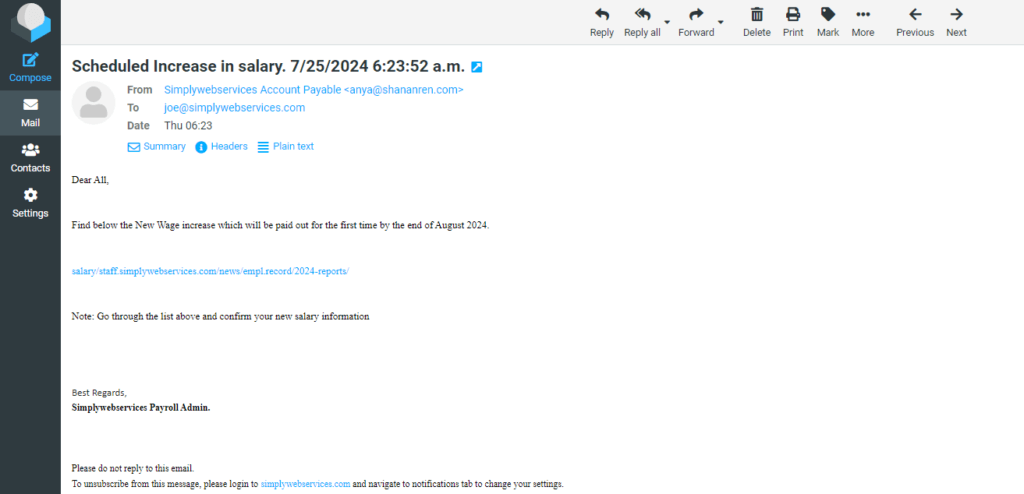
The link in the email redirects me to https://hardbin.com/ipfs/QmcyZ8MMHEWF9EvWJKMGSGBnmMYMmRrSkMCsX3jMwN4kdP/
index2gse####.html#joe@simplywebservices.com. (I obfuscated the URLs to protect the innocent)
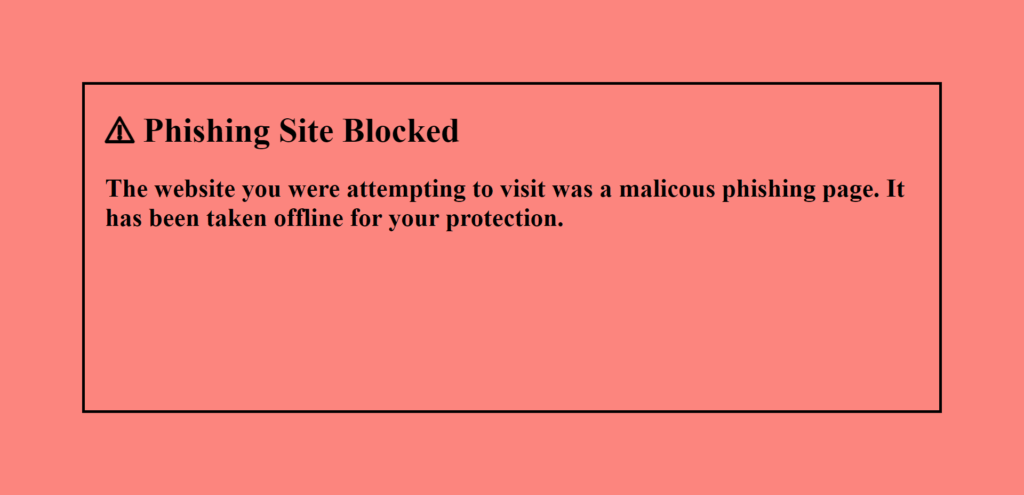
I couldn’t go any further as the website had already been removed and replaced with the below banner.
Despite not knowing much about our company, I do have to give them credit — they did a nice job crafting the email, including having it appear to come from Simply Web Services Accounts Payable. Including an unsubscribe link was a nice touch, too. It redirects to the same URL as the above salary report does.
I find it strange that they want me to look at the report on salaries and find mine. Does that mean that everyone else’s is listed on the report?
What to Watch For
Payroll and salary phishing emails are among the most effective scams because they exploit something almost everyone responds to — the prospect of more money. Here are the red flags specific to this type of attack:
- Unexpected salary or bonus notifications — if you didn’t request a compensation review, treat any email about it with suspicion
- Emails claiming to come from internal departments — Accounts Payable, HR, and Payroll are favorite impersonation targets for phishers
- Unsubscribe links in internal company emails — legitimate internal emails from your own employer never include unsubscribe links; their presence is a dead giveaway that the email is from an outside sender
- IPFS or unusual domain URLs — legitimate payroll systems use your company’s own domain, not third-party file storage networks
- Emails that invite you to “view a report” — this is a common lure designed to make clicking feel routine and harmless
Lessons Learned
- Simply Web Services does not send salary notifications, payroll reports, or compensation reviews by email — any such message claiming to be from us is a phishing attempt
- A well-crafted phishing email — complete with professional formatting and an unsubscribe link — is not proof of legitimacy; it is proof that attackers are getting more sophisticated
- Unsubscribe links in phishing emails lead to the same malicious destination as the main link — never click them
- If a phishing site has already been taken down by the time you investigate, the campaign is likely still active at a new URL — report the original email and stay alert for follow-up attempts
This Is A Four Part Series
- Let’s Go Phishing – Part 1
- Weekend Phishing Trip – Part 2
- Phishing Team – Part 3
- Email Phishing – Part 4
FAQs
Spear phishing is a targeted form of phishing where attackers research a specific individual or company and craft a highly personalized email designed to appear legitimate. Unlike bulk phishing emails sent to thousands of random addresses, spear phishing emails reference real names, job titles, company names, or internal processes — making them far more convincing and harder to dismiss at first glance. In this example, the attackers knew the target's email address and company name, but made the mistake of not knowing the recipient was the company's own payroll administrator.
Salary and payroll phishing emails are effective because they exploit curiosity and self-interest. Almost everyone would open an email claiming they are getting a raise or that a salary report is available for review. Attackers count on the recipient's excitement or curiosity to override their skepticism. These emails are also designed to create a sense of legitimacy by using familiar department names like "Accounts Payable" or "Human Resources" and including professional formatting, unsubscribe links, and official-looking branding.
No. In this example, the unsubscribe link redirected to the exact same malicious URL as the salary report link. Phishers frequently include fake unsubscribe links to make their emails appear more legitimate — legitimate bulk emails are required by law to include unsubscribe options, so adding one makes the phishing email look like a real marketing message. Never click an unsubscribe link in an email you didn't sign up for. If it appears to be from a company you recognize, go directly to that company's website to manage your preferences.
In this case, by the time the phishing link was investigated, the malicious website had already been removed — replaced with a takedown banner. This happens when phishing sites are reported to hosting providers, domain registrars, or law enforcement, who then force them offline. However, this does not mean the phishing campaign is over — attackers frequently move their operation to a new URL and continue sending the same emails. A dead phishing link is not a reason to assume the threat has passed.
Look for these warning signs: the sender's email domain does not match your employer's real domain, the email contains a link or button asking you to log in or download a file, the message uses urgent or enticing language (salary increase, bonus, urgent review required), and the email arrives unexpectedly with no prior context. When in doubt, contact your HR department or employer directly by phone — never using the contact information provided in the suspicious email itself.
Received an unexpected email about your salary, payroll, or a financial report? Don't click — verify first
Contact our support team — we’re always here to help you stay safe