
SPAM Is Out of Control
Lately, we have been experiencing a huge influx of spam emails, but this time, things are not what they seem.
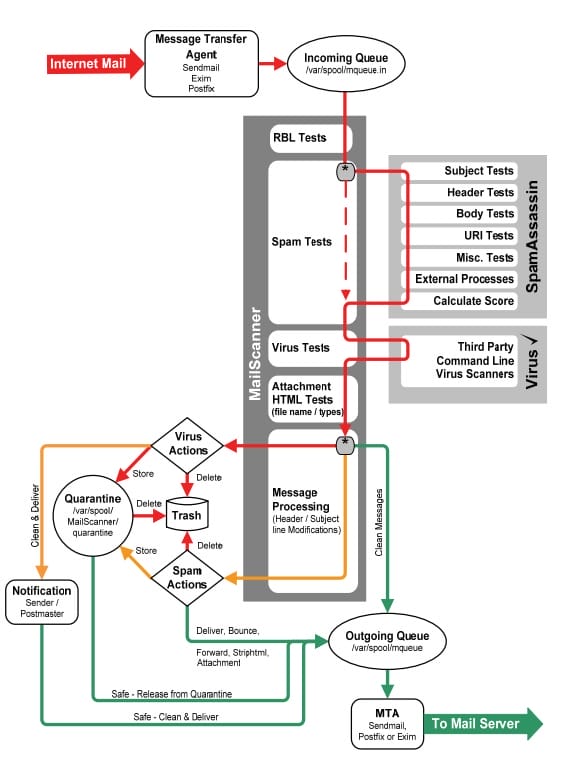
Our email server uses a software application called MailScanner, which checks every email message and gives it a score. The score is based on a large table of options, but the end goal is that the final calculated score is then either allowed to make it to your inbox or sent to the bit bucket (deleted).
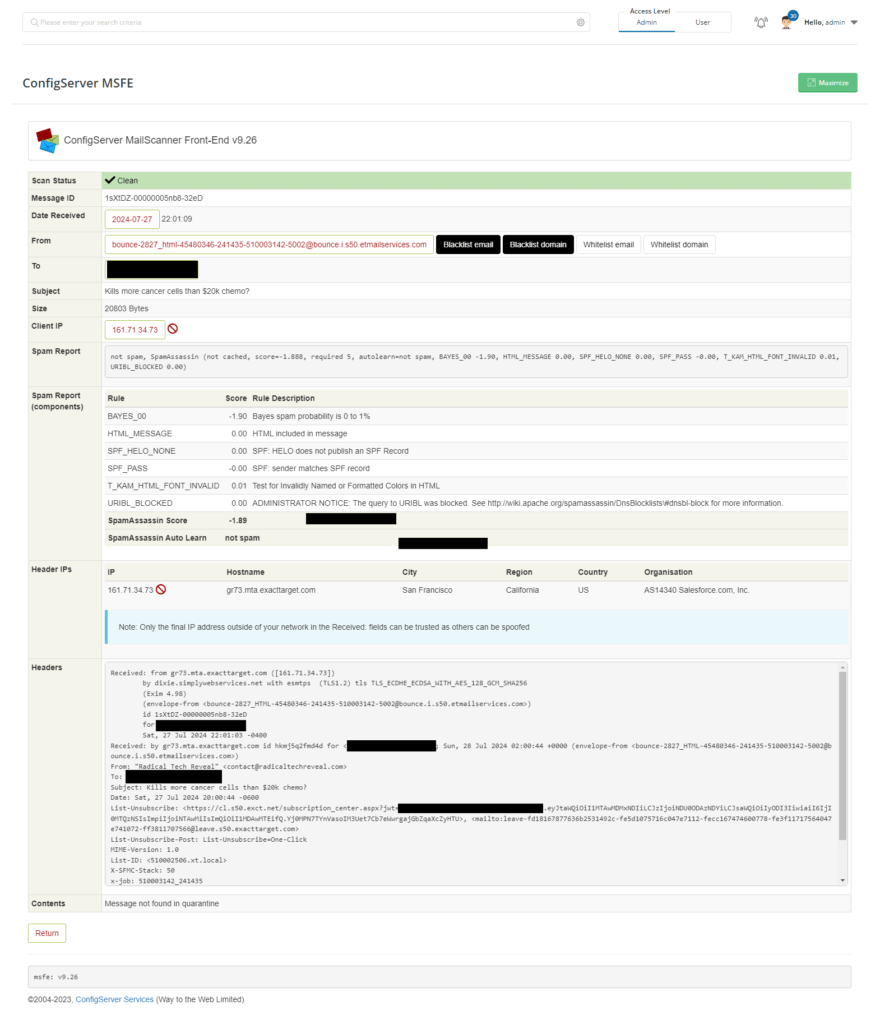
Let’s say for example that the email address is from info@myshop.store. We know from experience that most emails from .store are often SPAM, so MailScanner will score that higher than other emails.
MailScanner is a highly respected open-source email security system for Linux-based email gateways. It is used at over 40,000 sites worldwide, protecting top government departments, commercial corporations, and educational institutions. This technology has quickly become the standard email solution for virus protection and spam filtering at many ISP sites.
MailScanner scans email for viruses, spam, phishing, malware, and other attacks against security vulnerabilities and plays a major part in the security of a network. By being open source, the technology in MailScanner has been reviewed many times over by some of the best and brightest in the field of computer security from around the world. MailScanner supports a wide range of MTAs and virus scanners to include the popular open-source Clam AV.
Spam detection is accomplished via SpamAssassin, which is by far the most popular and standardized spam detection engine.
MailScanner has always worked well for us with little to no problems, and it is still working well, so why are we seeing such an increase in spam?
Normally, spam is unwanted email, like messages about your Netflix account having expired or about selling generic Viagra from a sketchy online pharmacy. But the current trend in spam is that someone sold your email address to a company, which then adds you to its mailing list.
There is good money in farming email addresses. They find valid email addresses and sell them in bulk. They are often sold to companies under the guise that they are valid addresses. Good companies purchase these, not thinking anything is wrong with them.
What we are seeing is clients getting added to something like Dick’s Sporting Goods, and now they receive their weekly specials and sales. Since this is a legitimate email from a legitimate company, MailScanner allows it to pass, and it shows up in their inbox. The problem is that for some email users, we are seeing eight to ten of these “sign-ups” a day.
We will see the following email pattern. We will use “Dick’s Sporting Goods” as our example, and “Tom” is the person receiving the emails.
“Thank you, Tom, for signing up with Dick’s Sporting Goods“
“Tom, verify your email address with Dick’s Sporting Goods“
“Welcome to Dick’s Sporting Goods, Tom!“
These three emails would all hit the email server in a five-minute time period. Of course, Tom didn’t sign up for Dick’s Sporting Goods, so he treats them as spam.
Not only does he forward the email to us, but he also reports it as spam. Reporting a message as spam is usually a good thing, but in this case, it is the polar opposite. Let me explain how that process works.
I’m going to use Gmail as my example because they have a report as spam button built into its interface. If you click the report as spam button, it alerts one of several spam-clearing houses that maintain databases of spam email messages. Let’s say that 10 people report the Dick’s Sporting Goods emails as spam, just like Tom did. The clearinghouse annotates it in its database, assuming it must be spam since so many people have reported it. The next time a Dick’s Sporting Goods email is sent, the receiving server’s anti-spam software (like MailScanner/SpamAssassin) will check the clearinghouse database and notice that they are flagged as a spammer. Depending on the settings on the mail server, MailScanner will do one of the following things:
- Allow the message
- Delay the message for up to 24 hours (this slows the SPAMMER down, and they often remove email addresses that do not reply within a certain time
- Route the message to Tom’s inbox on the server, but annotate that it is SPAM
- Toss the message into the bit bucket (delete it)
Tom and the others, stating that Dick’s Sporting Goods is a SPAMmer (when they aren’t), hurt Dick’s Sporting Goods marketing, specifically email marketing. I can tell you firsthand that it isn’t quick, simple, or easy to get a block like this removed.
The correct thing to do in a situation like that is to unsubscribe from the mailing list. Every legitimate company will have an unsubscribe link on its newsletters and other bulk mailings.
Sadly, there is no automated way to do this, as an app would not know whether you signed up for emails.
We currently have two clients whose email addresses must have been sold to the same list, as they are both getting identical spam, just seconds apart.
FAQs
MailScanner is a highly respected open-source email security system used at over 40,000 sites worldwide. It scans every incoming email message and assigns it a score based on dozens of spam and security indicators. Depending on the score, the message is either delivered to your inbox, delayed, flagged as spam, or deleted entirely. It also scans for viruses, phishing attempts, malware, and other security threats using tools like ClamAV and SpamAssassin.
Your email address was likely purchased by a company from a third-party list broker — a practice known as email address farming. These brokers collect and sell email addresses in bulk, often to legitimate businesses that may not realize the addresses were obtained without consent. As a result, you receive marketing emails from companies you've never interacted with.
If the email comes from a legitimate, recognizable company — even if you didn't sign up — you should unsubscribe rather than report it as spam. Reporting a legitimate company's email as spam can get them flagged in spam databases, damaging their email marketing reputation and potentially blocking their emails for thousands of other recipients. Use the unsubscribe link found at the bottom of every legitimate bulk email instead.
SpamAssassin is the most widely used open-source spam detection engine in the world. It evaluates incoming emails against hundreds of rules — including sender reputation, message content, link analysis, and known spam patterns — and assigns each message a cumulative score. MailScanner uses SpamAssassin's scoring as a key factor in determining whether an email should be delivered, flagged, or deleted.
The most effective steps are: (1) unsubscribe from any mailing lists you didn't intentionally join, (2) never click "report as spam" for legitimate companies — unsubscribe instead, (3) avoid posting your email address publicly on websites or directories where it can be harvested, and (4) contact your web host or email provider if the volume becomes unmanageable. Simply Web Services clients can reach our support team directly for assistance with email filtering settings.
Is your inbox being flooded with unwanted emails? We can help.
Simply Web Services monitors and manages email filtering for all of our hosting clients using industry-leading tools like MailScanner and SpamAssassin. If your email situation is getting out of hand — whether it’s spam overload, delivery issues, or suspicious messages