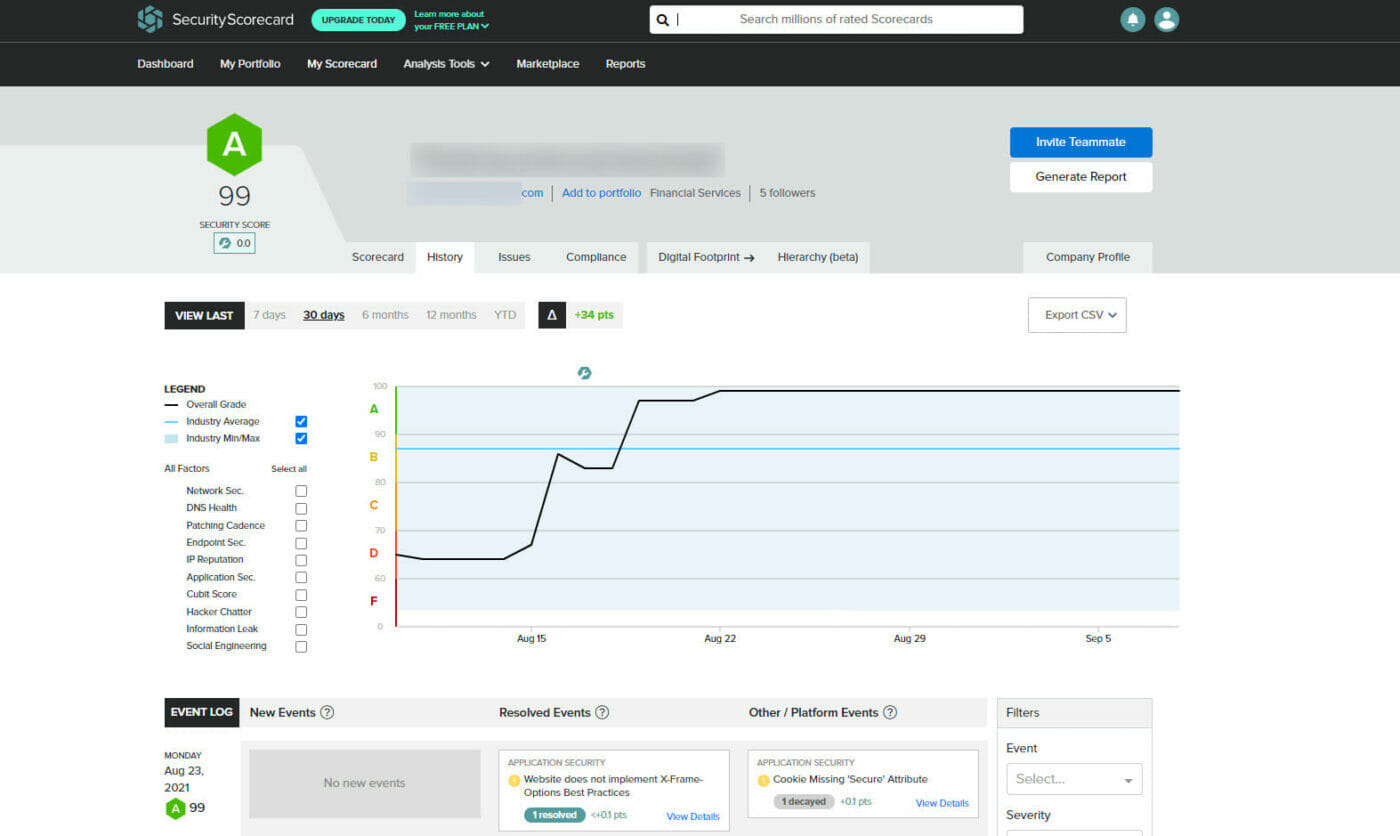
Cyber Security Scans - Part 3
After addressing over 900 findings in the Cyber Security scan report, I found that many were not from IPs in my subnet and were not related to the website being scanned. I started parsing the results, and the first thing to dispute was the IPs for domains not associated with my client. They had IP addresses and domain names for clients that had stopped using my services over 10 years ago, and three servers ago, so I have no clue how in the world they found those old websites.
From the best I can figure, they did a lookup on a site like IP-Neighbors.com, which performs a DNS lookup and an ARP lookup to find all the domains on the server. Then there is passive DNS, which allows you to dig into the DNS history of an IP address or a domain. The problem with some of these websites, like IP-Neighbors.com, is that they keep a history, which can be bad.
You are now talking databases of records for an IP or domain name, you can now pull the date they first and last saw that domain or IP, the other historical IP addresses and domain name and all the subdomains for an IP Address. So armed with all this historical information, the scanner was able to “find” old websites that are no longer being hosted by me or on my servers. So, if I once hosted mydomain.com and that client has since left me and moved to a new web host, using the historical data from passive DNS, they scanned that website and reported it’s vulnerabilities on this report. I mean, the original report was massive.
The Remaining “Vulnerabilities”
Website Does Not Implement HSTS Best Practices – The scanning company explains this one as:
HTTP Strict Transport Security is an HTTP header that instructs clients (e.g., web browsers) to only connect to a website over encrypted HTTPS connections. Clients that respect this header will automatically upgrade all connection attempts from HTTP to HTTPS. After a client receives the HSTS header upon its first website visit, future connections to that website are protected against Man-in-the-Middle attacks that attempt to downgrade to an unencrypted HTTP connection. The browser will expire the HTTP Strict Transport Security header after the number of seconds configured in the max-age attribute.
They recommended that:
Every web application (and any URLs traversed to arrive at the website via redirects) should set the HSTS header to remain in effect for at least 12 months (31536000 seconds). It is also recommended to set the ‘includeSubDomains’ directive so that requests to subdomains are also automatically upgraded to HTTPS. An acceptable HSTS header would declare: Strict-Transport-Security: max-age=31536000; includeSubDomains;
Content Security Policy Contains ‘unsafe-*’ Directive – The scanning company explains this one as:
The Content Security Policy (CSP) header can mitigate Cross-Site Scripting (XSS) attacks by preventing the browser from executing code embedded in your site’s HTML. However, the use of unsafe-eval and unsafe-inline policies in the CSP prevents this key safety feature from functioning. These unsafe directives mean that if the site is vulnerable to XSS or HTML injection attacks, an attacker can inject their own resources directly into the HTML response and have the browser execute them.
They recommended that:
Remove the unsafe directives from the content security policy. For trusted resources that must be used inline with HTML, you can use nonces or hashes in your content security policy’s source list to mark the resources as trusted. Nonces are randomly generated numbers placed with inline content that you trust. By including the nonce in both the content and the header, the browser knows to trust the script.
Content Security Policy Contains Broad Directives – The scanning company explains this one as:
The Content Security Policy (CSP) header can mitigate Cross-Site Scripting (XSS) attacks by prohibiting the browser from loading resources on your page from domains that you don’t explicitly trust. However, by using overly broad methods of describing what you trust (ie, ‘http:’, ‘*’, ‘http://*’) for your script-src and object-src directives, or your default-src directive in the absence of those directives, this key feature of the CSP header can be bypassed by an attacker.
They recommended that:
Explicitly specify trusted sources for your script-src and object-src policies. Ideally, you can use the ‘self’ directive to limit scripts and objects to only those on your own domain, or you can explicitly specify domains that you trust and rely upon for your site to function.
Unsafe Implementation Of Subresource Integrity – The scanning company explains this one as:
Many websites that rely on JavaScript and CSS stylesheet files will host these static resources with external organizations (typically CDNs) to improve website load times. Unfortunately, if one of these external organizations is compromised then the JavaScript and CSS files it hosts can also be compromised and used to push malicious code to the original website. Subresource integrity is a way for a website owner to add a checksum to all externally hosted files, which the browser uses to verify that files loaded from external organizations have not been modified.
They recommended that:
Add the following header to responses from this website: ‘X-XSS-Protection: 1; mode=block’
This is a fun one to figure out. The HTTP Header thing is an odd duck. You will see that I have the correct information, and when I scan with Security Headers (see below), it gets an “A+”. So I’m going to leave these as they are and see what shakes out.
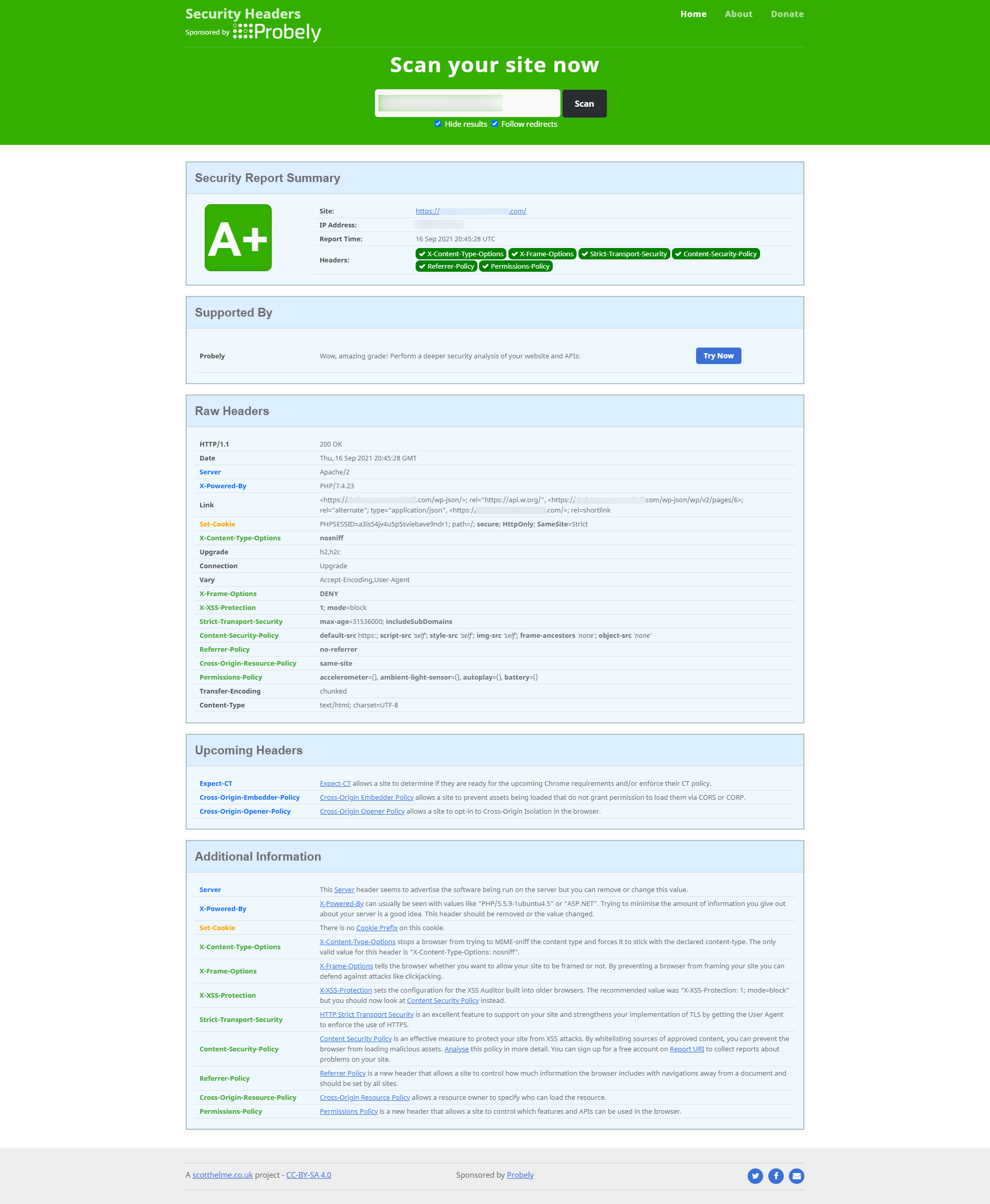
All said and done, it took about 6 hours to parse the report, dispute everything, and make the few changes I needed to do on the server/website, and bingo, I managed to get the score from a 64% D to 99% A+, which is 12 points higher than the national average.